Relationships & Joins
Why relationships exist
In a well-designed database, data is normalized: split across multiple tables to avoid duplication and maintain consistency.
Instead of storing user information with every expense:
expenses table (bad design):
id | user_name | user_email        | amount | description
---|-----------|-------------------|--------|------------
1  | Alice     | alice@example.com | 50.00  | Groceries
2  | Alice     | alice@example.com | 25.00  | Coffee
3  | Bob       | bob@example.com   | 100.00 | Rent
You store it once in a users table and reference it:
users table:
id | email              | name
---|--------------------|-------
1  | alice@example.com  | Alice
2  | bob@example.com    | Bob

expenses table:
id | user_id | amount | description
---|---------|--------|-------------
1  | 1       | 50.00  | Groceries
2  | 1       | 25.00  | Coffee
3  | 2       | 100.00 | Rent
This avoids duplication and makes updates easier (change Alice's email in one place, not hundreds).
Foreign keys
A foreign key is a column that references the primary key of another table. In the example above, expenses.user_id is a foreign key referencing users.id.
CREATE TABLE expenses (
  id SERIAL PRIMARY KEY,
  user_id INTEGER REFERENCES users(id),  -- Foreign key
  amount DECIMAL(10, 2) NOT NULL,
  description TEXT
);
Foreign keys:
- Create a relationship between tables
- Enforce referential integrity (can't create an expense with a non-existent user_id)
- Help the database understand how tables connect
Joins: combining tables
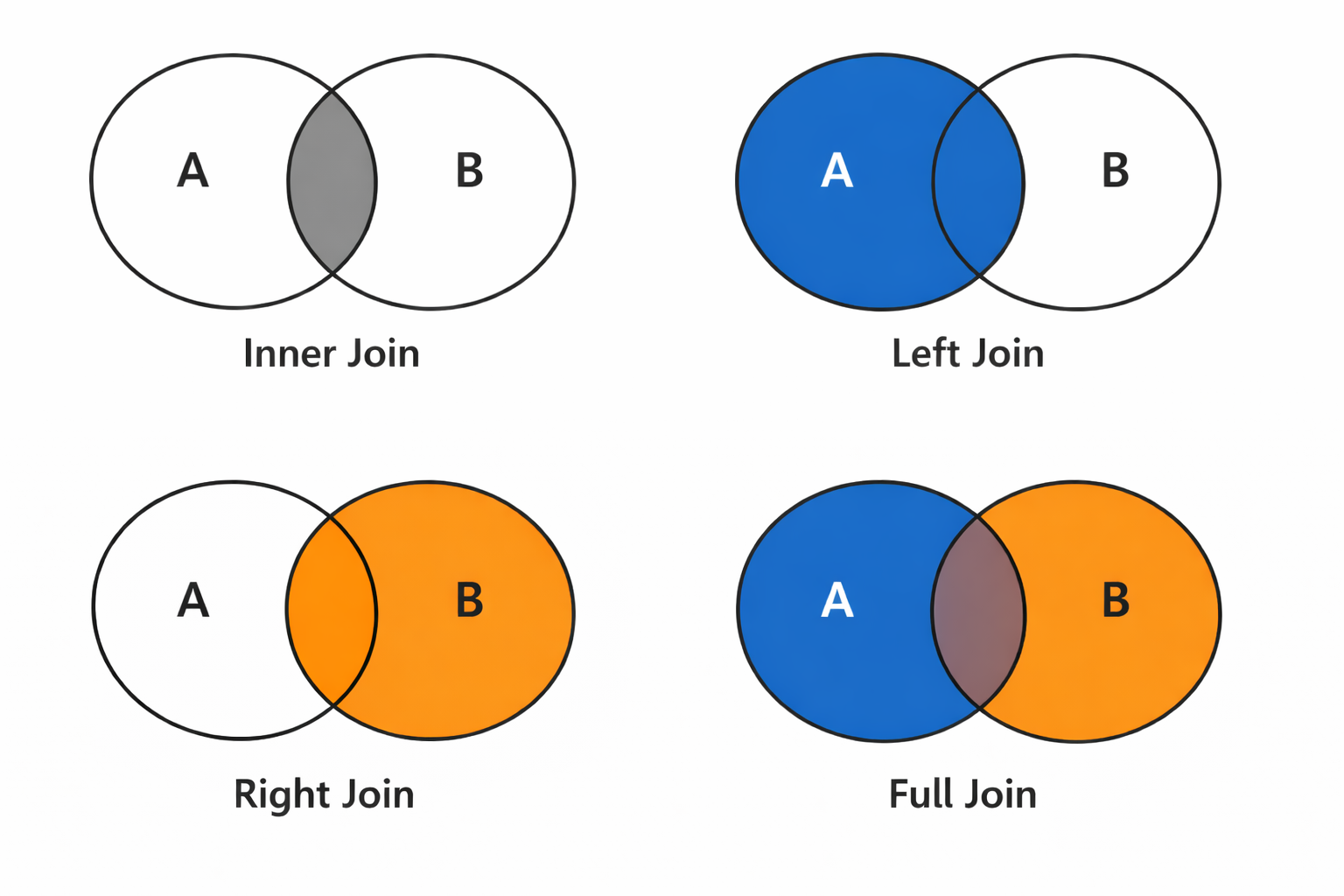
A join combines rows from two (or more) tables based on a relationship between them. Instead of storing everything in one huge table, you keep related data in separate tables and use joins to reconstruct the bigger picture when you query. The most common type is an INNER JOIN.
For the examples below, we'll use these sample tables:
users table:
id | email                | name
---|----------------------|-------
1  | alice@wolfcodes.dev  | Alice
2  | bob@wolfcodes.dev    | Bob
3  | carol@wolfcodes.dev  | Carol
expenses table:
id | user_id | amount | description
---|---------|--------|-------------
1  | 1       | 50.00  | Groceries
2  | 1       | 25.00  | Coffee
3  | 2       | 100.00 | Rent
4  | 2       | 15.00  | Bus fare
5  | NULL    | 10.00  | Movie ticket  -- user was deleted
Inner join
INNER JOIN returns only rows where there's a match in both tables:
SELECT users.name, expenses.amount, expenses.description
FROM users
INNER JOIN expenses ON users.id = expenses.user_id;
This returns:
name  | amount | description
------|--------|-------------
Alice | 50.00  | Groceries
Alice | 25.00  | Coffee
Bob   | 100.00 | Rent
Bob   | 15.00  | Bus fare
How it works:
- Start with the
userstable - For each user, find matching rows in
expenseswhereusers.id = expenses.user_id - Combine the columns from both tables
- Return only rows where there's a match
Reading joins left-to-right
Think of a join as reading left to right:
FROM users                    -- Start here (left table)
INNER JOIN expenses          -- Join with this (right table)
ON users.id = expenses.user_id;  -- Match on this condition
The "left" table (users) is the one in FROM. The "right" table (expenses) is the one in JOIN.
Left join
LEFT JOIN returns all rows from the left table, even if there's no match in the right table. Missing values are filled with NULL.
SELECT users.name, expenses.amount, expenses.description
FROM users
LEFT JOIN expenses ON users.id = expenses.user_id;
This returns all users, even if they have no expenses:
name  | amount | description
------|--------|-------------
Alice | 50.00  | Groceries
Alice | 25.00  | Coffee
Bob   | 100.00 | Rent
Bob   | 15.00  | Bus fare
Carol | NULL   | NULL          -- User with no expenses
Use LEFT JOIN when:
- You want all rows from the left table
- You want to find "users with no expenses" or similar
-- Find users with no expenses
SELECT users.name
FROM users
LEFT JOIN expenses ON users.id = expenses.user_id
WHERE expenses.id IS NULL;
Right join
RIGHT JOIN is the mirror of LEFT JOIN: it returns all rows from the right table, even if there's no match in the left table. Missing values are filled with NULL.
SELECT users.name, expenses.amount, expenses.description
FROM users
RIGHT JOIN expenses ON users.id = expenses.user_id;
This returns all expenses, even if they don't have a matching user (though this shouldn't happen with proper foreign keys):
name  | amount | description
------|--------|-------------
Alice | 50.00  | Groceries
Alice | 25.00  | Coffee
Bob   | 100.00 | Rent
Bob   | 15.00  | Bus fare
NULL  | 10.00  | Movie ticket    -- Expense with no matching user
Note: In practice, LEFT JOIN is used much more often than RIGHT JOIN. You can always flip the tables to achieve the same result:
-- These are equivalent:
SELECT * FROM users RIGHT JOIN expenses ON users.id = expenses.user_id;
SELECT * FROM expenses LEFT JOIN users ON expenses.user_id = users.id;
Most developers prefer LEFT JOIN because it reads more naturally (left-to-right).
Full outer join
FULL OUTER JOIN returns all rows from both tables, filling in NULL values where there's no match on either side.
SELECT users.name, expenses.amount, expenses.description
FROM users
FULL OUTER JOIN expenses ON users.id = expenses.user_id;
This returns all users and all expenses:
name  | amount | description
------|--------|-------------
Alice | 50.00  | Groceries
Alice | 25.00  | Coffee
Bob   | 100.00 | Rent
Bob   | 15.00  | Bus fare
Carol | NULL   | NULL          -- User with no expenses
NULL  | 10.00  | Movie ticket    -- Expense with no matching user
When to use: FULL OUTER JOIN is useful when you want to see all data from both tables, including unmatched rows on either side. However, it's rarely needed in practice—most queries use INNER JOIN or LEFT JOIN.
Table aliases
When joining multiple tables, use aliases to keep queries readable:
SELECT u.name, e.amount, e.description
FROM users u
INNER JOIN expenses e ON u.id = e.user_id;
u is an alias for users, e is an alias for expenses. This is especially helpful with longer table names.
Multiple joins
You can join more than two tables:
CREATE TABLE categories (
  id SERIAL PRIMARY KEY,
  name TEXT NOT NULL
);

-- expenses table now has category_id
CREATE TABLE expenses (
  id SERIAL PRIMARY KEY,
  user_id INTEGER REFERENCES users(id),
  category_id INTEGER REFERENCES categories(id),
  amount DECIMAL(10, 2) NOT NULL
);

-- Join three tables
SELECT u.name, c.name as category, e.amount
FROM expenses e
INNER JOIN users u ON e.user_id = u.id
INNER JOIN categories c ON e.category_id = c.id;
Common join mistakes
Forgetting the ON condition
-- ❌ Wrong: missing ON clause (creates a Cartesian product!)
SELECT * FROM users, expenses;

-- ✅ Correct: specify the join condition
SELECT * FROM users
INNER JOIN expenses ON users.id = expenses.user_id;
Without an ON clause, you get a Cartesian product: every row from the first table paired with every row from the second. This is almost never what you want and can create millions of rows!
Using WHERE instead of ON
-- Works, but less clear
SELECT * FROM users, expenses
WHERE users.id = expenses.user_id;

-- Better: explicit join
SELECT * FROM users
INNER JOIN expenses ON users.id = expenses.user_id;
Modern SQL style prefers explicit JOIN syntax over comma-separated tables with WHERE conditions.
Join explosions
Be careful with one-to-many relationships. If a user has 100 expenses, joining will create 100 rows for that user:
-- This might return way more rows than expected
SELECT users.*, expenses.*
FROM users
INNER JOIN expenses ON users.id = expenses.user_id;
If you just want user info, don't join:
-- Just get users
SELECT * FROM users;
NULL in join conditions
If the foreign key column is NULL, the join won't match:
-- Expenses with NULL user_id won't appear in INNER JOIN
SELECT * FROM users
INNER JOIN expenses ON users.id = expenses.user_id;

-- Use LEFT JOIN to see them
SELECT * FROM expenses
LEFT JOIN users ON expenses.user_id = users.id
WHERE users.id IS NULL;  -- Expenses with no user
Visualizing joins
Think of joins as a Venn diagram:
- INNER JOIN: The intersection (only matching rows)
- LEFT JOIN: The entire left circle (all left rows, matching right rows)
- FULL OUTER JOIN: Both circles (all rows from both tables)
Practical example
-- Get total spending per user
SELECT
  u.name,
  COUNT(e.id) as expense_count,
  SUM(e.amount) as total_spent
FROM users u
LEFT JOIN expenses e ON u.id = e.user_id
GROUP BY u.id, u.name
ORDER BY total_spent DESC;
This query:
- Joins users with their expenses
- Groups by user
- Counts expenses and sums amounts per user
- Sorts by total spent (highest first)